Free image tool · No sign-in

YouTube Banner Size and Safe Area Checker

Upload your channel art to check its original dimensions and file size. Reposition the crop, preview the central text and logo area and export the recommended YouTube banner size. The crop tool processes your image in your browser and uses no AI credits.

AI-generated examples

Ads, event graphics and channel covers generated from specific briefs. The brands, people and events are fictional demonstrations. Each example includes its model, export dimensions and full prompt.

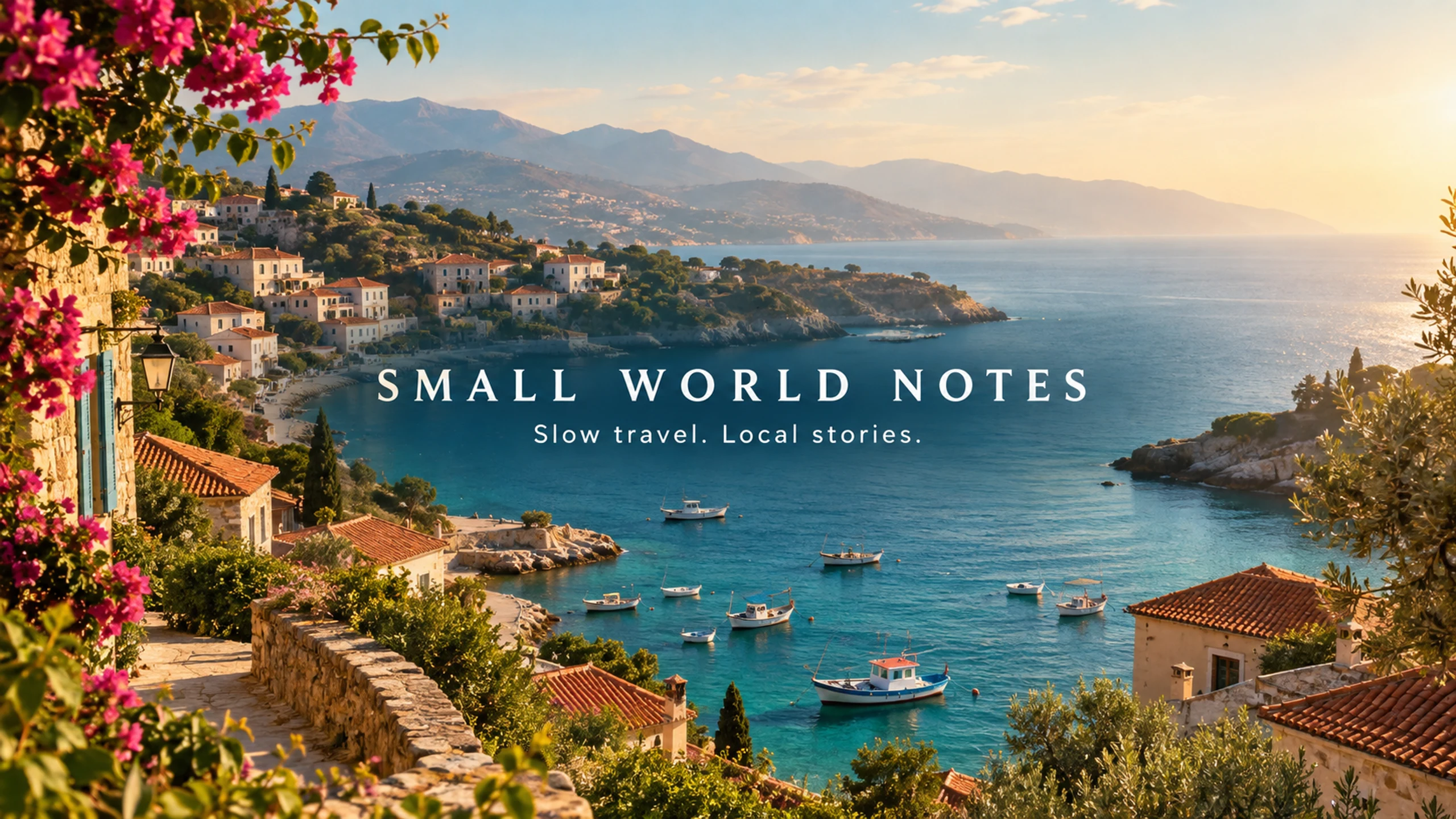
AI-generated SMALL WORLD NOTES YouTube channel art with a coastal village and centered slow-travel channel lettering.
GPT Image 2

A slow-travel YouTube channel

SMALL WORLD NOTES · Coastal channel art with the title and tagline placed in the central band.

View the full generation prompt

AI generated · Fictional brief

Model
GPT Image 2
Export
2560 × 1440 px
Source
1672 × 941 px

Resized and exported as WebP

Create one finished YouTube channel-art image for the fictional slow-travel channel SMALL WORLD NOTES. A 16:9 landscape canvas intended for export at 2560 by 1440 pixels. All essential text must fit inside a compact central horizontal strip: x=22 to 78 percent of image width, y=39 to 61 percent of image height. This is a real channel-art composition, not a video thumbnail. Do not put title text near the top or bottom. Art direction: cinematic but gentle travel editorial photography, an original sunlit Mediterranean-style coastal village seen from a hillside, terracotta roofs, small fishing boats, soft turquoise sea, warm morning haze and natural film texture. Avoid recognizable landmark replicas and do not use a real travel-company logo. Let the scenery extend across the outer canvas, but keep the central text area visually calm with a subtle natural darker tonal area for contrast. In the exact center, render the title "SMALL WORLD NOTES" in elegant, widely spaced warm-white uppercase typography; directly below, render "Slow travel. Local stories." in a smaller clean typeface. Keep both lines easily readable inside the specified central strip. No other text, dates, flags, icons, faces, subscriber counts, fake platform buttons, watermark, device mockup or visible safe-area guide. Deliver one flat channel-art image.

The prompt retains the brief’s requested dimensions; actual export dimensions are listed above. New generations will vary.

How to use this tool

  1. 01

    Check the original file

    Upload a PNG, JPEG or WebP. The tool reads the source dimensions and file size, so you can see whether it meets the minimum 2048 × 1152 dimensions, 16:9 shape and 6 MB limit before resizing.

  2. 02

    Choose your canvas and crop

    Use 2560 × 1440 for the recommended canvas or 2048 × 1152 for the minimum. Move the crop with the horizontal and vertical controls; no stretching is applied.

  3. 03

    Export and inspect

    Choose PNG or JPEG and download the exact-size image. The export is checked against the file-size limit. The safe-area guide is excluded; inspect the result in YouTube Studio before publishing.

YouTube banner dimensions

Recommended canvas: 2560 × 1440 pixels. Minimum upload dimensions: 2048 × 1152 pixels with a 16:9 aspect ratio. The file must be 6 MB or smaller. These banner requirements are different from the requirements for a profile picture or video thumbnail.

At the minimum canvas, YouTube specifies a 1235 × 338 area for text and logos. On a 2560 × 1440 canvas, scaling by 1.25 gives a guide of 1543.75 × 422.5 pixels, approximately 1544 × 423. The preview uses the proportional values so the guide remains centered and consistent.

Why part of your banner disappears

YouTube displays the same banner differently on computers, phones and TVs. A full-canvas preview can hide this problem: words near the top, bottom or far edges may be outside the visible area on another device.

Place essential lettering and logos inside the central guide. Keep decorative scenery outside it. The checker shows geometric bounds; it cannot recognize whether all your text lies inside them or guarantee how every device will display the result.

Fixing common upload problems

If the source is smaller than the minimum, use a higher-resolution original where possible. Upscaling can satisfy the pixel count but cannot reconstruct detail. If the image has the wrong shape, cropping to 16:9 removes edges without distorting the subject.

If a PNG export is too large, try JPEG or lower the JPEG quality and inspect the result for compression artifacts. Changing the filename extension alone does not change the format or reduce the file size.

If the crop cuts through text, reposition the image. When the text itself is too wide for the safe area, adjust the original design in an editor; cropping cannot rearrange flattened letters independently.

Platform specification reference: YouTube banner image guidelines. Confirm the platform's current guidance and upload preview before publishing.

Frequently asked questions

Is 2560 × 1440 required?

It is YouTube's recommended size, especially for TV. The minimum is 2048 × 1152 with a 16:9 aspect ratio. This checker supports both export sizes.

Does the checker upload or store my image?

No. Files selected in this crop tool are decoded and processed in your browser. AI generation is a separate feature that sends prompts and optional reference images to the generation service.

Can it improve a blurry image?

No. It changes the crop and output dimensions. Enlarging a low-resolution source does not add real detail; use a sharper original or create a new background.

Can I download without an account?

Yes. Local checking, cropping and export require no sign-in and use no credits.

YouTube Banner Size & Safe Area Checker | AIBanner