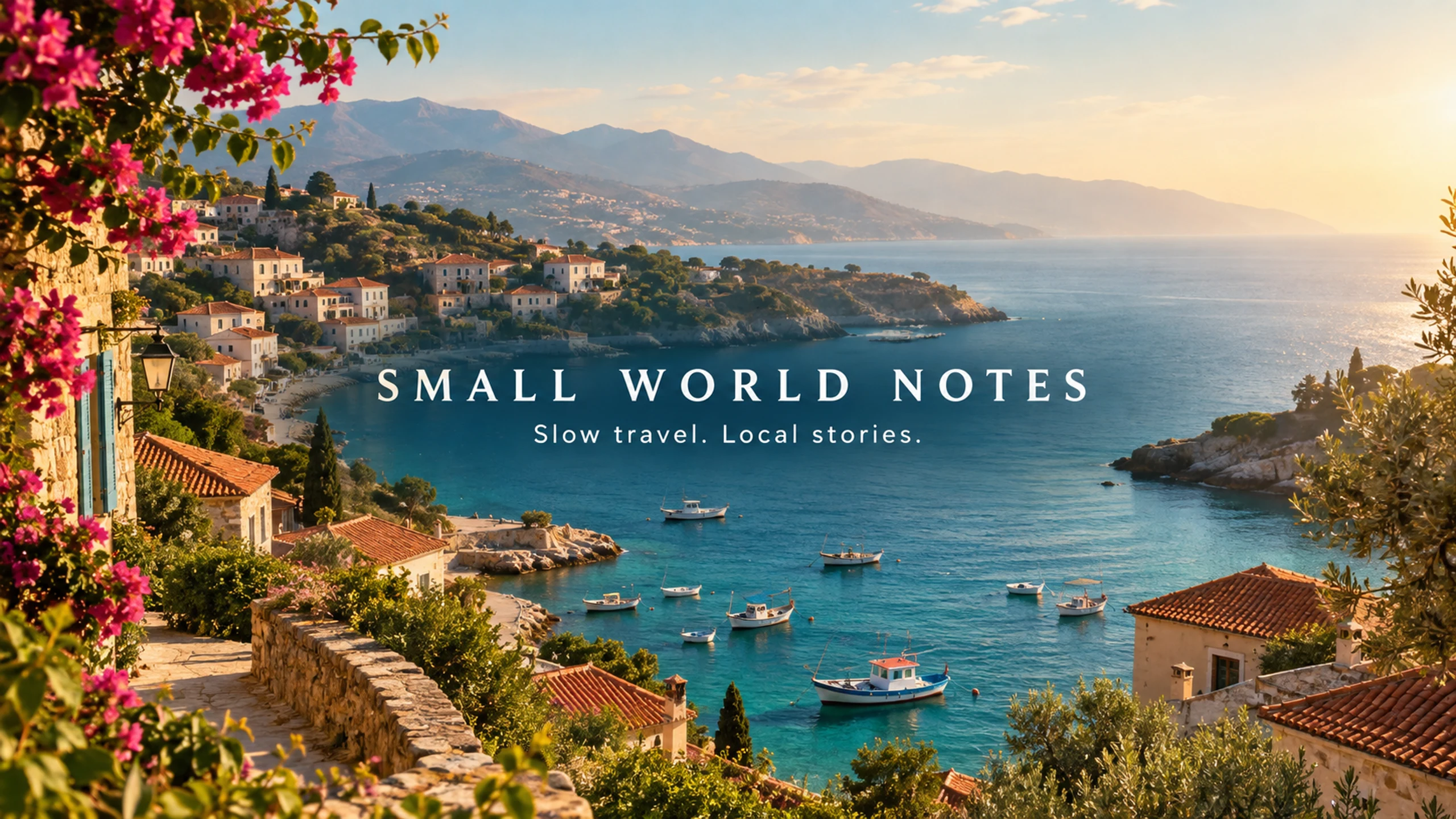
Channel art · 2560 × 1440 px

AI YouTube Banner Generator

Turn a channel idea into a banner background, then check how its composition fits YouTube's central safe area. Generate with a prompt or reference image, adjust the crop and export an exact-size image. The guides stay out of your download.

AI generation requires sign-in and uses 2 credits per request. New accounts receive 5 trial credits. Local cropping is free. Crop an existing image

Generate a banner background

Describe your background and optionally add a reference image to guide the visual style.

Advanced settings16:9 · 1 image

Optional: upload a PNG, JPG, or WEBP image up to 3MB to guide the generation.

Generate a 16:9 original, then crop and export the platform size below. You can also upload an existing image directly to the crop tool.

1 image · 2 credits total (2 per image)

Try an idea
Generated Results

Your generated image will appear here for preview and download.

AI-generated examples

Ads, event graphics and channel covers generated from specific briefs. The brands, people and events are fictional demonstrations. Each example includes its model, export dimensions and full prompt.

AI-generated SMALL WORLD NOTES YouTube channel art with a coastal village and centered slow-travel channel lettering.
GPT Image 2

A slow-travel YouTube channel

SMALL WORLD NOTES · Coastal channel art with the title and tagline placed in the central band.

Fills the prompt and model. Does not generate or spend credits.

View the full generation prompt

AI generated · Fictional brief

Model
GPT Image 2
Export
2560 × 1440 px
Source
1672 × 941 px

Resized and exported as WebP

Create one finished YouTube channel-art image for the fictional slow-travel channel SMALL WORLD NOTES. A 16:9 landscape canvas intended for export at 2560 by 1440 pixels. All essential text must fit inside a compact central horizontal strip: x=22 to 78 percent of image width, y=39 to 61 percent of image height. This is a real channel-art composition, not a video thumbnail. Do not put title text near the top or bottom. Art direction: cinematic but gentle travel editorial photography, an original sunlit Mediterranean-style coastal village seen from a hillside, terracotta roofs, small fishing boats, soft turquoise sea, warm morning haze and natural film texture. Avoid recognizable landmark replicas and do not use a real travel-company logo. Let the scenery extend across the outer canvas, but keep the central text area visually calm with a subtle natural darker tonal area for contrast. In the exact center, render the title "SMALL WORLD NOTES" in elegant, widely spaced warm-white uppercase typography; directly below, render "Slow travel. Local stories." in a smaller clean typeface. Keep both lines easily readable inside the specified central strip. No other text, dates, flags, icons, faces, subscriber counts, fake platform buttons, watermark, device mockup or visible safe-area guide. Deliver one flat channel-art image.

The prompt retains the brief’s requested dimensions; actual export dimensions are listed above. New generations will vary.

How to use this tool

  1. 01

    Describe a background for your channel

    Include your topic, palette and mood. Ask for a simple center with space for a future title. A reference image can guide the visual direction but does not provide editable design layers.

  2. 02

    Check the safe-area guide

    Move the image within the crop and inspect the central guide. YouTube uses one banner across different devices; the full 16:9 canvas is not visible everywhere.

  3. 03

    Export and upload to YouTube

    Export the recommended 2560 × 1440 canvas or the minimum 2048 × 1152 option. Keep the file at 6 MB or smaller, then review YouTube Studio's own preview before publishing.

A background that works beyond the full canvas

A detailed full-screen scene can look good on a TV while losing its main subject on a phone. Put essential lettering and logos inside the central guide and use the outer canvas for decorative background. The guide is an aid to composition, not a promise about every device.

The safe-area outline scales with the canvas. It uses YouTube's 1235 × 338 area at the minimum 2048 × 1152 resolution, rather than incorrectly using that same pixel rectangle at every export size.

Build the image in two stages

Start with a background and visual direction. Generate again if the central composition does not work, then crop the version you prefer. A crop can remove unwanted edges; it cannot move individual subjects or recover detail outside the source image.

For readable channel titles or exact brand artwork, add those elements in a design editor and upload the composed image to our size checker. Generated letters may contain mistakes. This page produces flattened images and does not offer editable typography.

Already have channel art?

Use the local image tool below without generating a new image, or open the dedicated YouTube banner size checker for a sizing reference. Your uploaded file stays in the browser when used only for cropping and export.

If the source is too small, exporting more pixels does not improve its underlying sharpness. Begin with the largest usable source you have, watch the upscaling notice and inspect the exported image before uploading it.

Platform specification reference: YouTube banner image guidelines. Confirm the platform's current guidance and upload preview before publishing.

Frequently asked questions

Is AI YouTube banner generation free?

New accounts receive 5 trial credits. Each AI-generated image uses 2 credits. Checking, cropping and exporting your own image is free and does not require an account.

Will the safe-area box appear in my banner?

No. The guide is a separate preview overlay. The download contains only the cropped image.

Why does YouTube still crop the image?

Different devices display different portions of channel art. The full canvas is useful for larger screens, while text and logos need to fit within the central area. Always check YouTube Studio's preview.

AI YouTube Banner Generator — Create Channel Art | AIBanner