Static profile banner · 1200 × 480 px

AI Twitch Banner Generator

Set the mood for your Twitch channel with a static profile banner. Describe your stream, palette and style, generate a background, then position the crop at 1200 × 480. You can also upload an existing image and resize it for free.

AI generation requires sign-in and uses 2 credits per request. New accounts receive 5 trial credits. Local cropping is free. Crop an existing image

Generate a banner background

Describe your background and optionally add a reference image to guide the visual style.

Advanced settings16:9 · 1 image

Optional: upload a PNG, JPG, or WEBP image up to 3MB to guide the generation.

Generate a 16:9 original, then crop and export the platform size below. You can also upload an existing image directly to the crop tool.

1 image · 2 credits total (2 per image)

Try an idea
Generated Results

Your generated image will appear here for preview and download.

AI-generated examples

Ads, event graphics and channel covers generated from specific briefs. The brands, people and events are fictional demonstrations. Each example includes its model, export dimensions and full prompt.

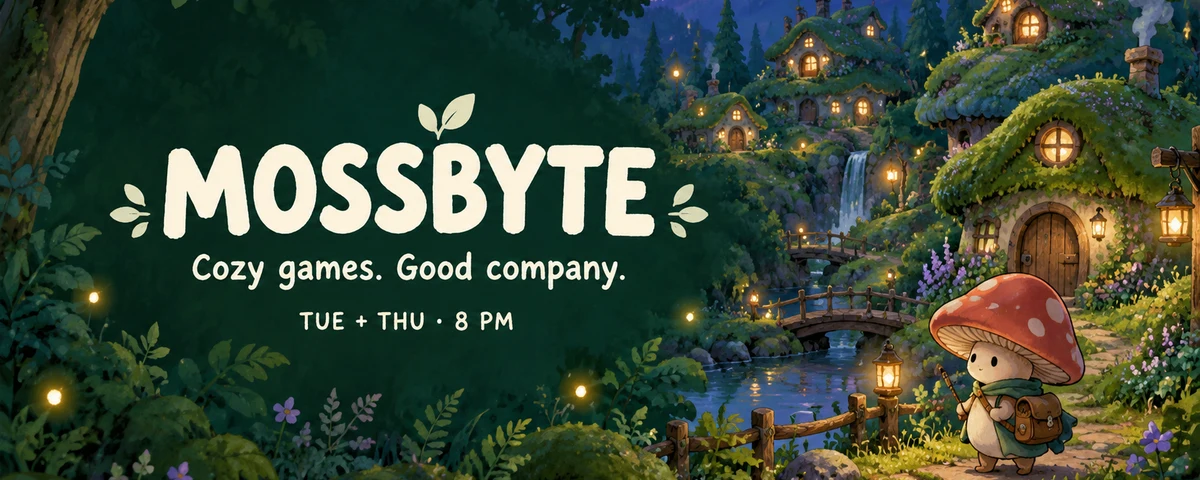
AI-generated MOSSBYTE Twitch banner with a cozy woodland village, cream channel lettering and a streaming schedule.
GPT Image 2.5 Flare

A cozy gaming channel

MOSSBYTE · A woodland profile banner with a channel name, community theme and streaming schedule.

Fills the prompt and model. Does not generate or spend credits.

View the full generation prompt

AI generated · Fictional brief

Model
GPT Image 2.5 Flare
Export
1200 × 480 px
Source
1672 × 941 px

Cropped, resized and exported as WebP

Create one finished static Twitch profile banner for a fictional cozy-gaming streamer called MOSSBYTE. Final target: 1200 by 480 pixels, 5:2 aspect ratio. If generated in 16:9, ensure the essential design survives a centered 5:2 crop: all text should fall between 34 and 59 percent of source-image height and between 8 and 48 percent of its width. Original art direction: a charming hand-painted woodland game world at blue hour, deep forest green, muted lilac, amber window lights, tiny rounded moss-covered cottages, a winding path, warm fireflies, and a small original mushroom character with a satchel on the far right. Make it feel like an inviting indie-game community, without referencing any existing game, character or artist. Leave a calm deep-green area toward the left for readable cream typography. Exact text: bold friendly headline "MOSSBYTE"; smaller line "Cozy games. Good company."; smallest readable schedule "TUE + THU · 8 PM". Keep the decorative scene extending to the right and place no important text near the outer edges. Do not include an offline-screen label, chat window, webcam box, follower count, game logos, platform logo, QR code, watermark or other text. One finished flat channel banner.

The prompt retains the brief’s requested dimensions; actual export dimensions are listed above. New generations will vary.

How to use this tool

  1. 01

    Choose your channel's visual theme

    Describe what you stream and the atmosphere you want. Name colors and composition rather than relying on another creator's artwork or a game's protected characters.

  2. 02

    Keep important graphics toward the left

    Generate an image or upload your own. Reposition the crop at 1200 × 480 and keep the key visual toward the left, following Twitch's profile-banner guidance.

  3. 03

    Review your channel page

    Download the static image and upload it in your Twitch channel's branding settings. Check the result in different window widths; the platform display can change.

Profile banner, offline screen or overlay?

This tool makes the static profile banner used on your channel page. That is different from a video-player offline image, a stream overlay or a panel below the player. These placements serve different purposes and do not share one universal size.

The output is a 1200 × 480 image. It does not animate, connect to broadcasting software or generate an overlay package. Keeping the task specific makes it easier to create and check the asset you actually need.

Design for a changing window width

Twitch recommends concentrating important graphics toward the left because the profile-banner display changes with the browser width. Do not assume YouTube's centered safe-area rule applies to Twitch.

Use the crop controls to find a composition that retains the main shape or subject. A detailed scene may need a new generation with a wider composition; moving the crop cannot reveal content outside the original image.

Create a consistent channel background

A cozy stream can use muted colors and gentle shapes; a competitive channel might prefer stronger contrast. Use a prompt idea or the AI-generated example on this page as a starting point. Edit the brief to match your own channel before generating.

You can request channel lettering in your prompt. Check the spelling and placement after generation; exact typography can also be added in a separate design editor before sizing. This tool does not offer editable text layers. Uploading to the crop tool alone does not send your source image to a server.

Platform specification reference: Twitch channel page setup. Confirm the platform's current guidance and upload preview before publishing.

Frequently asked questions

Do I need an account to resize a Twitch banner?

No. Uploading, cropping and exporting an existing image works without signing in. AI generation requires an account and uses 2 credits per image, with 5 trial credits for new accounts.

Can this make animated Twitch banners or overlays?

No. This page exports a static profile banner in PNG or JPEG. It does not create animated overlays, emotes or offline video-player screens.

Can I include my own logo?

You can upload an image containing a logo you have permission to use and crop it. An AI reference can guide the look, but it does not guarantee an exact reproduction of the logo.

AI Twitch Banner Generator — Profile Banner Maker | AIBanner